Hello!

Product design case study

ShiftForge
AI.

Cut manual processes and inform
decisions for labor operations.

Patrick Teall
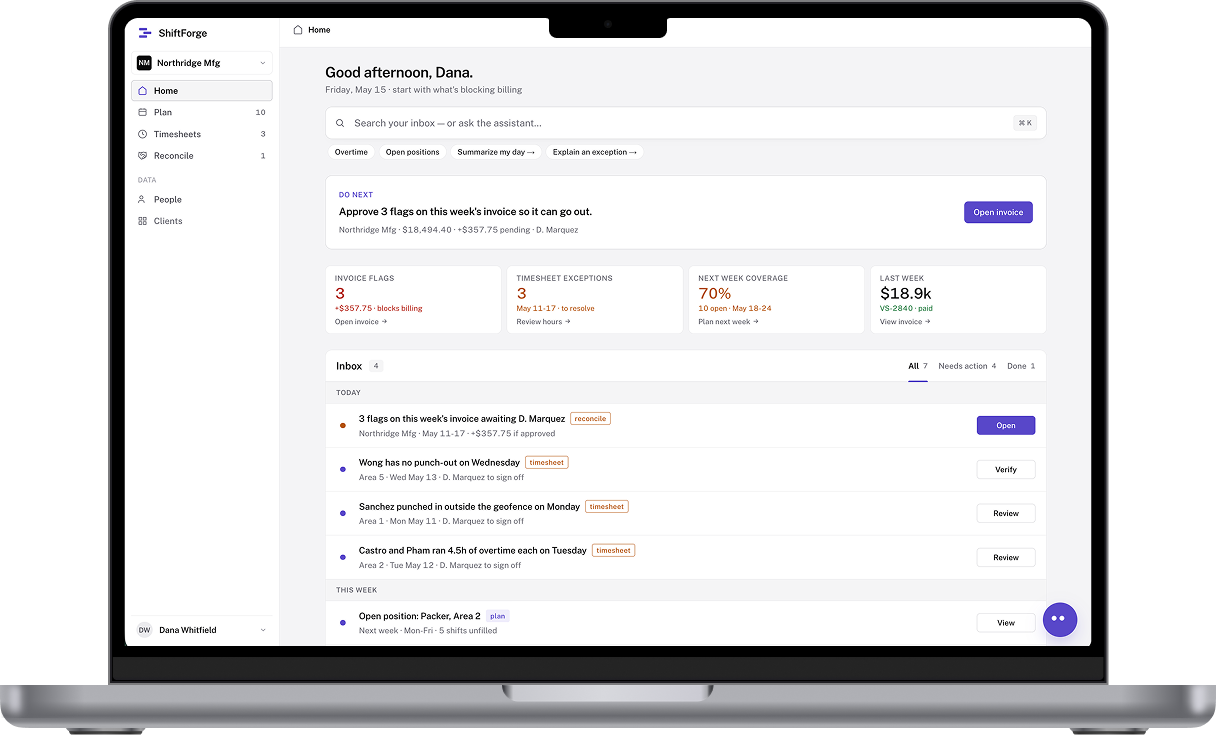
MacBook displaying the ShiftForge home screen
Hook: the agency can only staff an accurate, approved request. Production variability is upstream context. The screenshot is the redesigned prototype with sample data, not a measured outcome.

Why I designed and built ShiftForge

My role

Earlier domain work

2years

designing in this problem space

Researching and improving labor operation workflows.

ShiftForge

3months

designing and building an AI-native solution

Reducing manual processes and informing staffing decisions.

Patrick observed the work across departments, operators, agency managers, and directors. He redesigned earlier planning, allocation, time, and HR flows. The independent AI-native product and build are his. Three-month duration retained from the existing opening draft.

The challenge for contract manufacturing

Industry context

Busy manufacturing floor with workers and active conveyor lines

Contract manufacturers

Producing for brands means labor needs are always changing.

Staffing agency

Provide temp staff based on labor requests.

Keep this to a brief definition before explaining responsibilities. Brands place orders with a manufacturer; the manufacturer uses staffing agencies for temporary labor. Orient the audience to the relationship before moving to shared responsibilities. This illustrative image comes from the ShiftForge project assets and does not depict a ShiftForge customer, research participant, or verified temporary worker.

Temp staffing is like
catering an event.

Every week is different and it's
important to have extra workers.

Use this analogy to explain why staffing plans need room to adjust as production demand changes.

Staffing at a high level

Shared workflow
ManufacturerStaffing Agency
Manufacturer
01 Plan

Labor requests

~4 hours

Staffing agency
02 Staff

Allocating workers

~24 hours

ManufacturerStaffing agency
03 Run

Covering shifts

60 minutes

ManufacturerStaffing agency
04 Verify

Cleanup timesheets

~4 hours

ManufacturerStaffing agency
05 Invoice

Approve costs

3-5 days

Use the sequence to orient the audience. The product starts with labor demand and carries records forward. It does not configure production lines. Reveal the time labels on the next click. This is a qualitative synthesis of Patrick’s cross-organization workflow observations, not a time-and-motion study. The time labels are directional estimates supplied by Patrick, not measured durations. Each step requires people to compare records, confirm commitments, or route exceptions across organizational boundaries. Traditional separate staffing, scheduling, time, and billing tools make a current cross-party status difficult to assemble. The examples illustrate why manual action accumulates; do not claim every incumbent lacks each feature.

The cost becomes visible after the shift.

~4 hrs

reconciling timesheets

15–30%

invoices require correction

3–5 days

resolving billing disputes

These figures were already in the opening draft and earlier case-study files. Their source records, sample, and dates need confirmation. They describe reported baseline pain, not ShiftForge impact. Remove this slide from interview delivery if the figures cannot be substantiated.

Problem

Setting up plans and allocating workers are manual processes, and corrections delay invoicing.

State the problem after the evidence: plan setup and allocation require manual work, and corrections delay invoicing. These are workflow observations, not a measured outcome.

How can AI reduce manual processing and inform decisions?

Frame the question first, then reveal the goal: build an AI-native platform designed around agentic workflows. The following examples show where people retain approval and commitment authority.

My AI design process

Process
01

Research

  • Interviews, focus groups, pain points.
02

Scope

  • Process mapping, agentic workflow, prioritization.
03

UI design

  • Inspiration, references, design system.
04

Functional prototyping

  • Local LLM, agentic workflow validation, simulations.
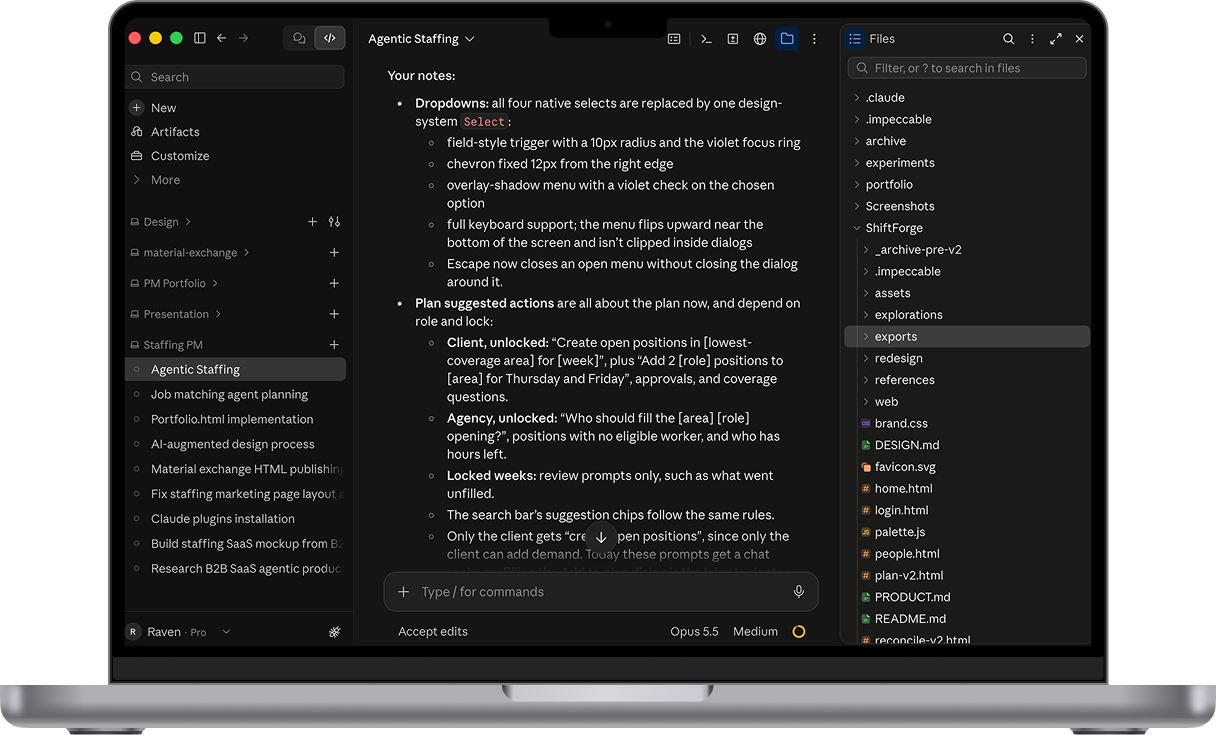
Laptop displaying the working notes and project files used during ShiftForge prototyping
Describe how the process moved from research evidence to a scoped set of AI-assisted and human-owned tasks. Interviews and focus groups surfaced workflow pain points. Process mapping identified an agentic workflow and guided prioritization. UI references informed a design system used to iterate from low to high fidelity. Functional prototyping included building a local LLM setup to verify agent workflows and creating test data to simulate processes. The workspace image illustrates the working environment, not the ShiftForge product interface. This does not claim training a foundation model or deploying the agents to production.

The core workflows

Case focus
01Plans
02Timesheets
03Invoices
Introduce the three core workflows. Start with plan demand, approval and agency allocation.

From a plan to a published schedule

Planning
Human actionAI-assisted
1

Draft plan

Manufacturer + AI

2

Approve plan

Manufacturer

3

Recommend workers

AI

4

Assign workers & publish

Staffing Agency

Follow the four-stage planning flow from an AI-assisted draft through department approval and AI-assisted matching to agency assignment and publication. The final stage combines two agency actions; after publication, the system locks the week. The manual plan example comes next, followed by the cross-page assistant and Plan approval interface. The legend marks the primary action at each stage; a recommendation is never itself an assignment or approval. Department heads manage their demand; permitted operations roles can manage across departments; agencies alone assign/unassign workers. A changed demand request reopens approval, and workers confirm assignment requests outside this captured state.

Plant managers can draft plans

Planning
1Draft plan234

Departments can set up plans in bulk quickly and easily

The video shows a manager using the Add to plan form to enter multiple positions across three roles, selected weekdays, and Area 1. The shift requirement belongs to the scheduled opening, but a shift selector is not visible in this crop; do not point to one. Authorized department users manage their own demand; operations permissions may span departments. The user confirms the addition, and each department approves its request before agency fulfillment. The visible Add to plan button is a human action, not an approval.

Or ask ShiftBot to help

Planning
1Draft plan234
Need help with planning?

AI assisted planning.

Open on any page to inform or assist with actions.

Why this interface: existing operators navigate datasets, not only conversation. The assistant can open across pages to inform or assist with actions. Describe persistent memory as an opportunity if asked; do not claim it is demonstrated without showing it.

Plant managers review and approve plans

Planning
12Approve plan34

Departments review the labor request and approve the plan.

Plan prototype video showing the department labor request and approval workflow. Sample data; this is a captured UI state, not a measured operational outcome.

Planning agent suggests assignments

Planning
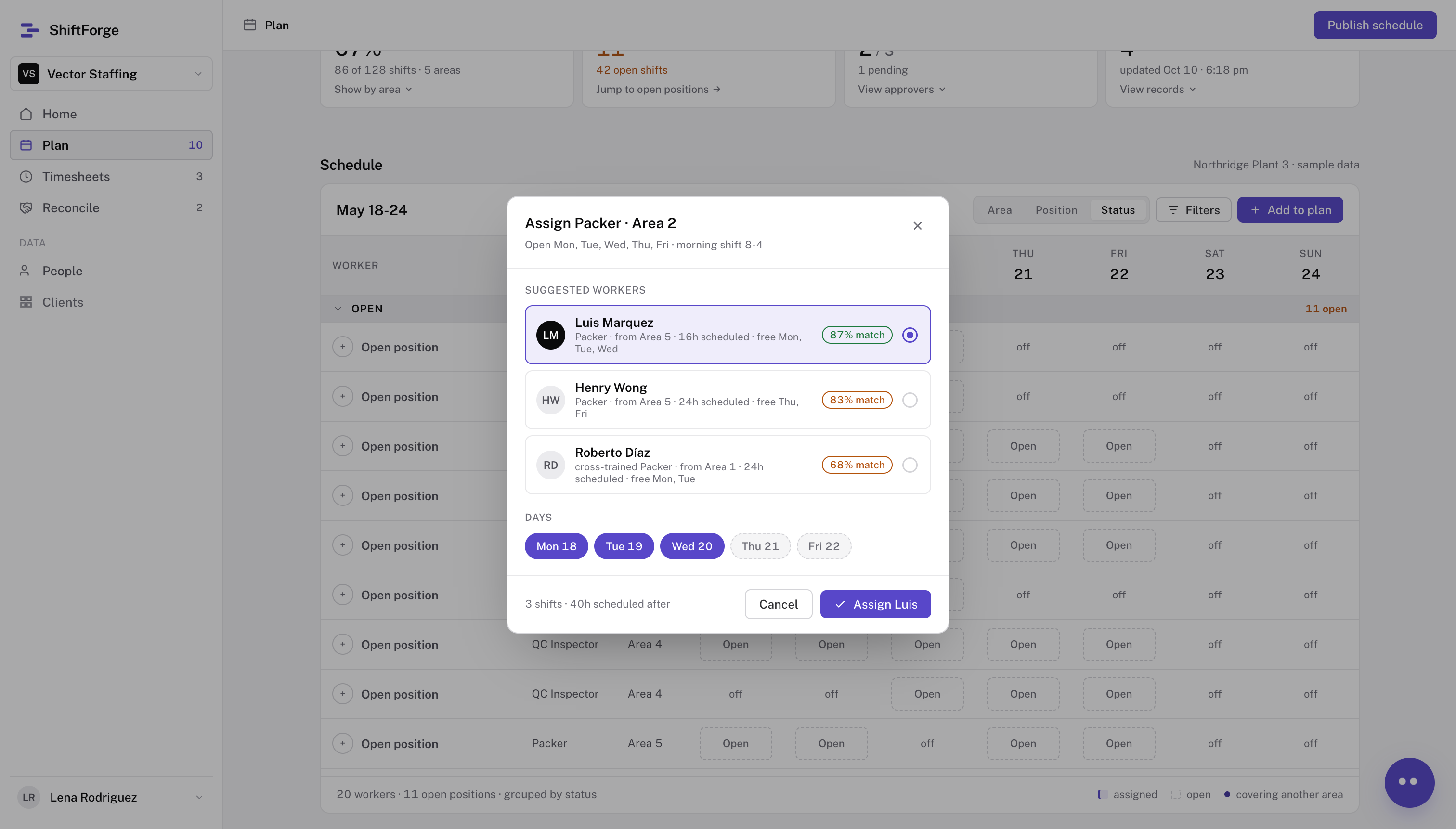
123Recommend workers4

The planning agent recommends eligible and available workers.

Agent references HR and active plan data.

Assignment proposal in the planning screen, showing suggested workers, available days, and a human Assign action
Climax: a recommendation does not equal a confirmed worker. The planner selects a worker and days, a manager approves the assignment, and the worker responds to the request. The modal shows the selection; manager approval and later worker confirmation by text or app are not shown in this capture. Agency users can assign and unassign workers; reassignment remains a human action. Immediate undo and permissioned audit amendments are part of the defined design; avoid implying they are visible in this modal. Video replacement: compare candidates, adjust days, select, undo.

The core workflows

Case focus
01Plans
02Timesheets
03Invoices
Transition from planning and allocation into worked time, exceptions and human review.

Timesheets - tracking operations

Timesheets
Human actionAI-assistedAutomatic
1

Flag exceptions

2

Propose corrections

AI

3

Resolve and Approve

Manufacturer + Staffing Agency

4

Submit to Invoice

Staffing Agency

Trace the four-step timesheets flow. Worker punches enter the record before the sequence shown here. System checks flag exceptions, and the assistant proposes a fix. The combined Resolve and Approve step represents supervisor resolution and manufacturer or agency approval of changes; it does not collapse their separate authority. The agency submits approved time to invoicing, where the invoice is generated from that record. The action colors show the primary responsibility. This is a proposed workflow, not measured runtime behavior.

Reviewing timesheet records

Timesheets
1Flag exceptions234

Plant managers can
review hours and
respond to exceptions.

Brief Timesheets prototype video using sample data. Describe only the interactions visible in the clip; do not present its figures as measured outcomes.

System flags exceptions in real-time

Timesheets
1Flag exceptions234

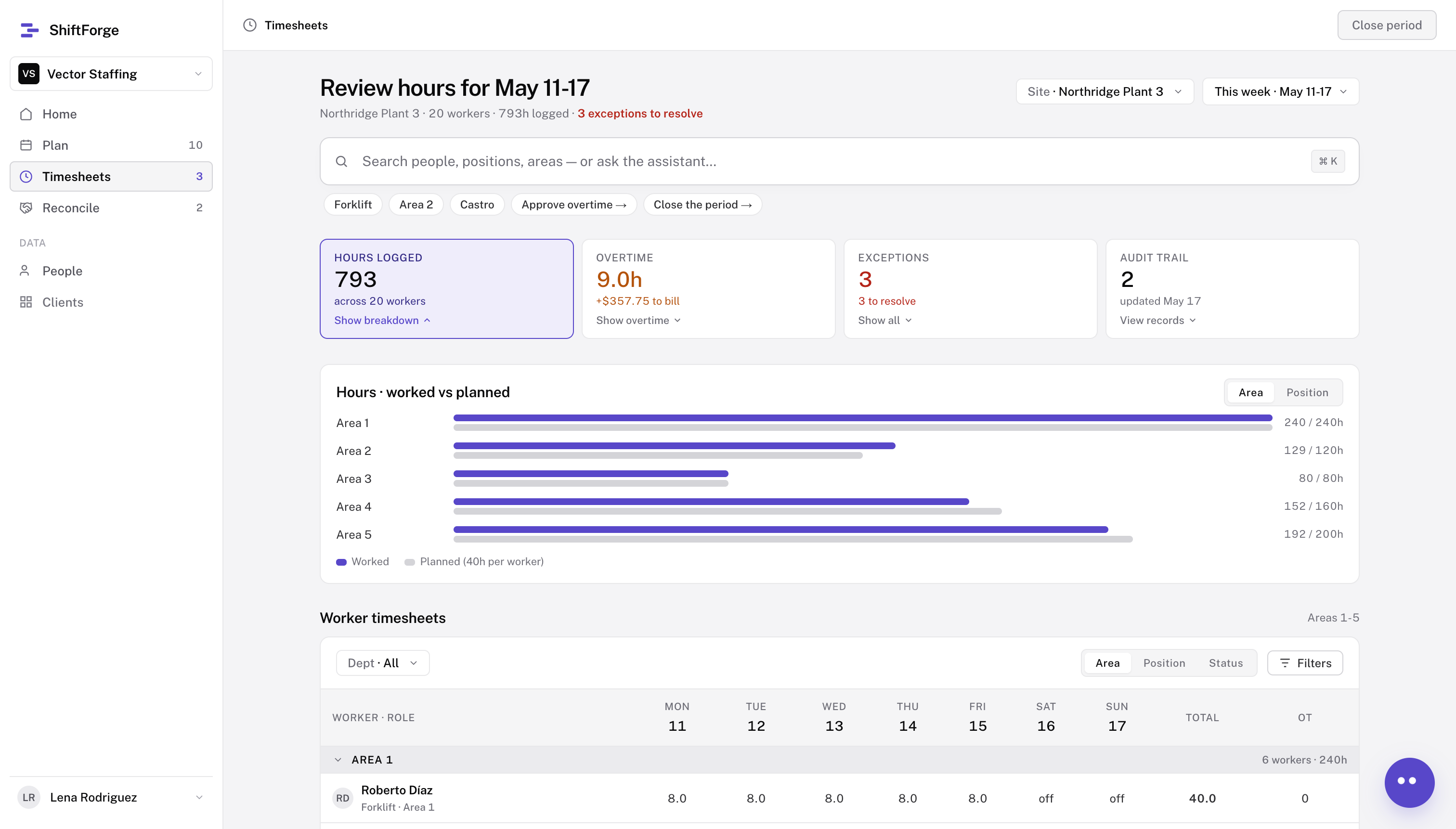
Plant managers can easily navigate the data and identify exceptions.
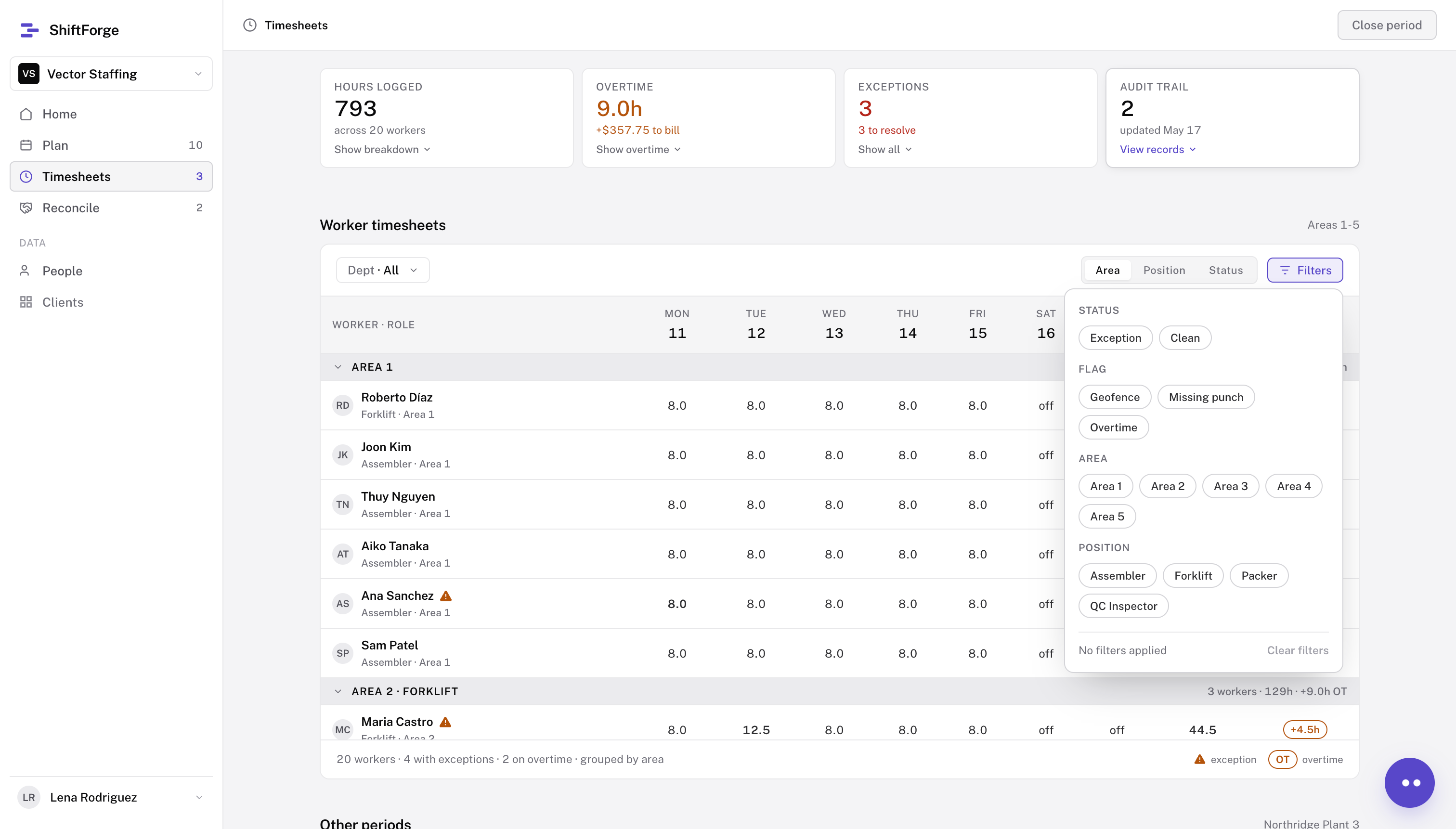
Worker timesheets screen with filters open for status, flag, area and position
Timesheets hours view comparing worked and planned hours by area, with overtime and exception summaries
The first captured prototype state opens filters over the worker timesheets table. Switch to the hours dashboard to show worked versus planned hours by area. These are sample end-of-week screenshots, not proof of a live data feed or a validated forecast. In the proposed workflow, hours update as shifts are logged; exception flags and an overtime forecast can prompt review before period close. Distinguish the dashboard’s 9.0 hours of logged overtime from a forward-looking forecast.

Reconciliation agent proposes corrections

Timesheets
12Propose corrections34

Exceptions surface with a suggested action.

Agent references schedule, timesheet, and HR data.
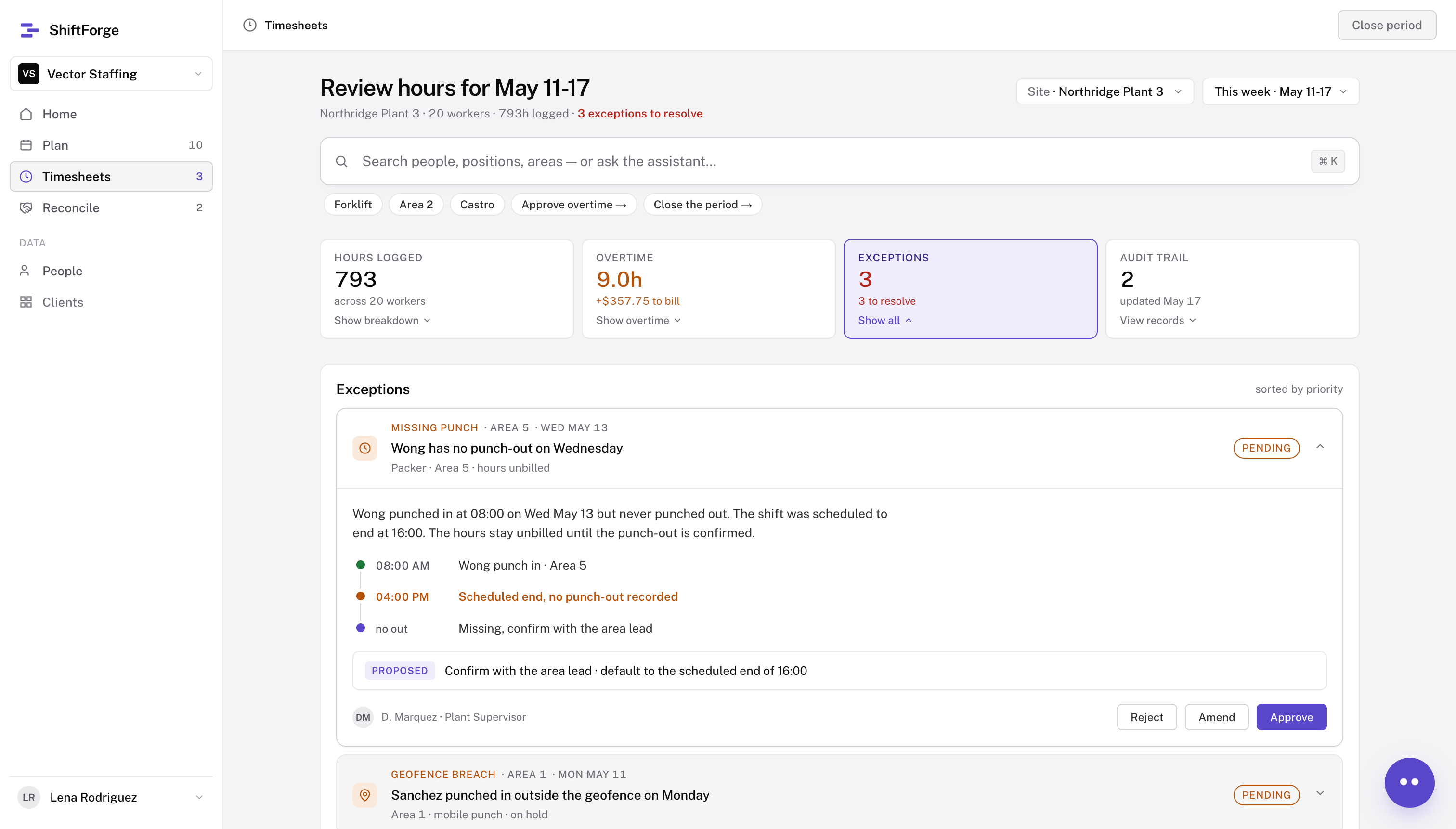
Expanded missing punch exception with a proposed scheduled end and review actions
ExceptionTimelineProposed actionHuman review
In the missing punch case, the recorded 08:00 clock-in differs from the scheduled 16:00 end; the proposed clock-out is a suggested action, not an observed event. Supervisor confirmation supports the decision, with approve, amend and reject actions. Do not imply that an LLM inferred the suggested action.

The core workflows

Case focus
01Plans
02Timesheets
03Invoices
Transition from approved time records into invoice reconciliation and the final send decision.

How a timesheet becomes a bill

Invoices
Human actionAI-assistedAutomatic
1

Draft invoice

System

2

Flag issues

AI agent

3

Resolve flags

Plant Managers

4

Submit Invoice

Staffing Agency

Trace the four-step reconciliation flow. The system drafts the invoice from approved hours and rates; AI flags issues; plant managers resolve them; the agency sends the approved invoice to accounts payable. The four stages are a design sequence, not a capture of one completed invoice transaction. A flag is a prompt to review, not a correction or approval.

Invoice is drafted from timesheets

Invoices
1Draft invoice234

Manufacturers and staffing agencies review invoices and approve costs.

Invoices prototype video using sample data. Present this as a demonstration of the review workflow, not a completed customer transaction or measured outcome.

Reconciliation agent flags issues

Invoices
12Flag issues34

The agent suggests adjustments for each flagged issue.

Agent references timesheets, policies and HR data.
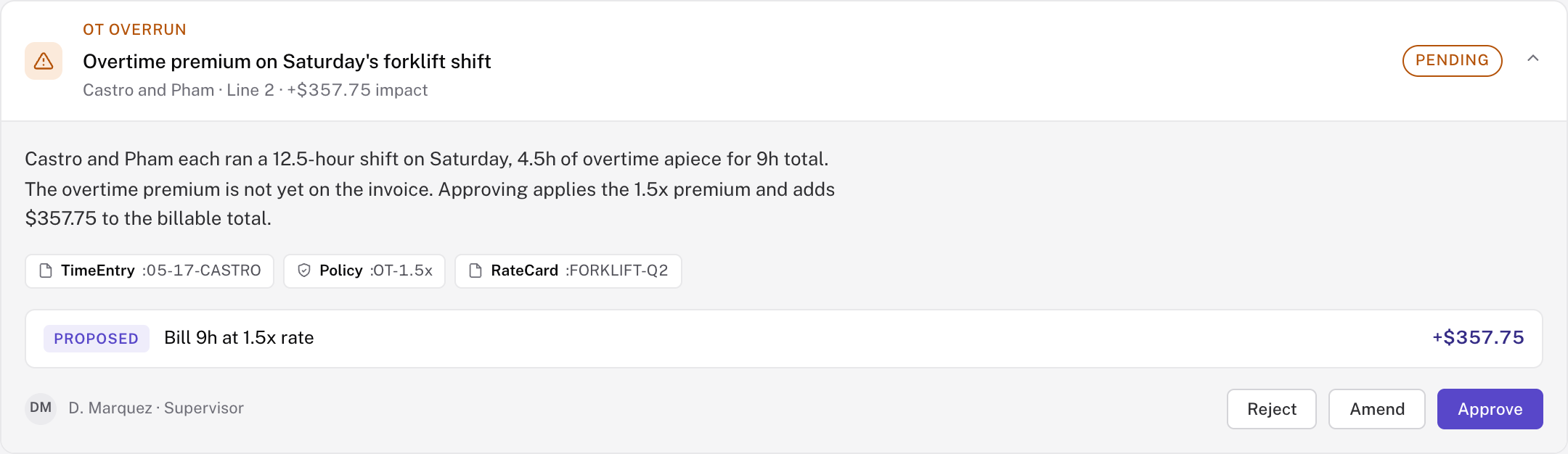
Expanded Reconcile flag card showing an overtime exception, cited time and policy records, a proposed billing adjustment, and supervisor review actions
Flag typeContactSource linksHuman approval
Use the expanded Reconcile flag card as a concrete example of the authority boundary. The orange overtime exception is a system check; TimeEntry, Policy, and RateCard chips cite the source; the proposed adjustment is prepared for review; D. Marquez can reject, amend, or approve. The screenshot is an isolated captured prototype state and should not be described as a continuation of the invoice totals on adjacent slides. Rates are HR-managed by worker/position and overtime rules are organization-defined.

Plants and agencies approve the invoice

Invoices
1234Submit Invoice

Confirm the approved total.

Adjusted, reviewed, and approved by both parties.
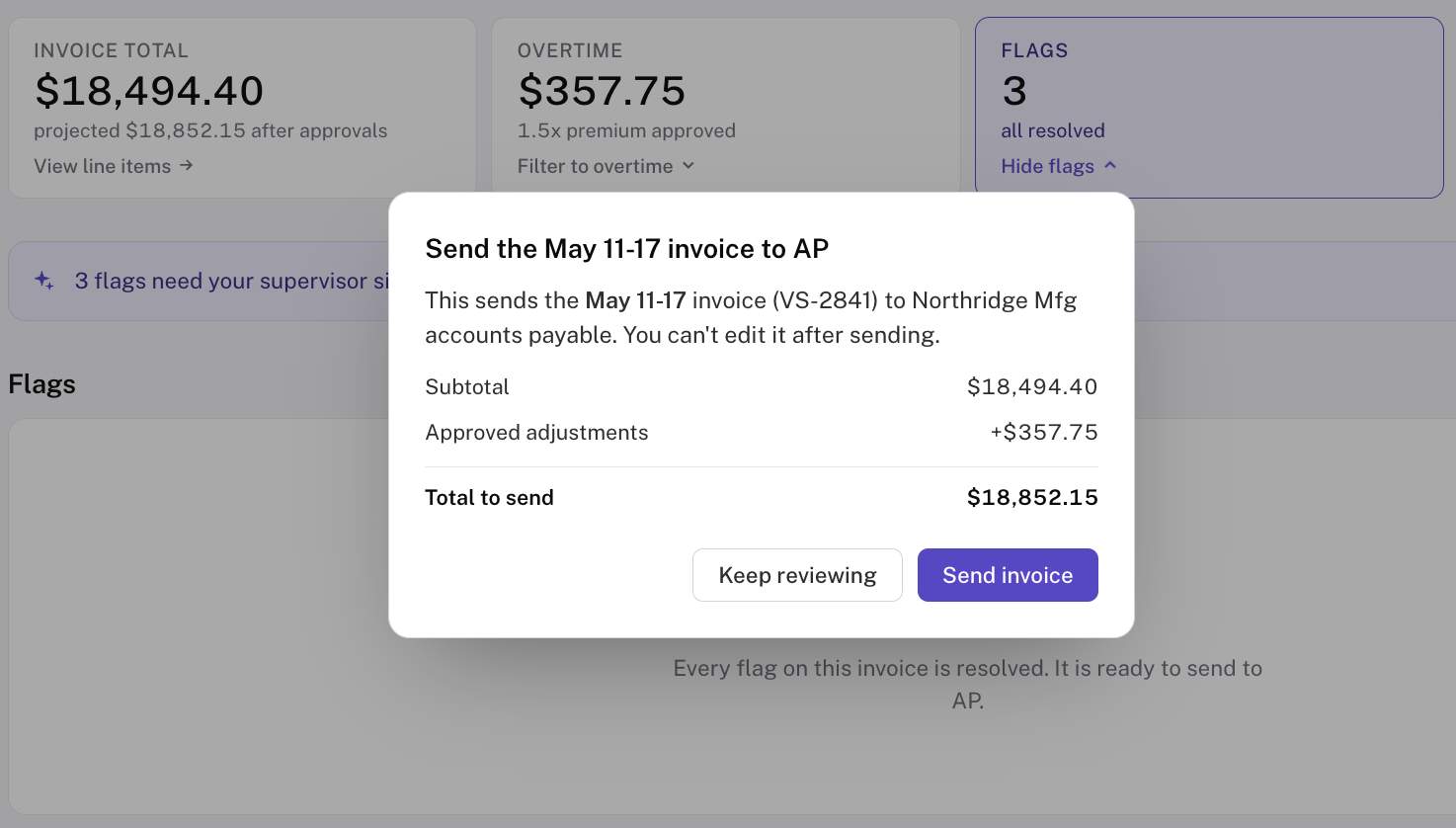
Invoice page with all flags resolved and a confirmation dialog showing the total and Send invoice action
The confirmation dialog is a captured prototype state with sample amounts. It shows the total and approved adjustment before the agency sends the invoice to accounts payable. Sending is a separate human action, and the dialog states the invoice cannot be edited after sending. Do not present the sample total as a measured or reconciled result.

AI constraints I designed around

AI design
  • Made-up references

  • Over-narration

  • Unexpected behavior

  • Cost per use

Comic illustration of a person navigating gaps toward a goal flag
Four proposed AI constraints. Step one shows the risks: made-up references, over-narration, unexpected behavior, and cost per use. Step two reveals Patrick’s design responses. Guardrails and suggested actions set the agent’s intended role and authority; running on a local LLM is his proposed cost response, not a claim of measured production savings.

Exploring impact through simulation

Simulated results

I simulated the processes with similar-sized datasets to compare against the baseline.

~80%

less planning setup

0 hours

unexpected overtime

15–30% → 0%

invoices needing correction

Source: https://www.patrickteall.com/work/shiftforge, Impact section (accessed October 13, 2026). Patrick labels these figures simulated data from agent simulations compared with research baselines, with staffing-agent testing still ahead. The source reports ~80% less planning setup, invoices needing correction from 15–30% to 0%, and zero surprise overtime events. Patrick supplied the displayed 0 hours of unexpected overtime during slide review; the published source uses events rather than hours. Present every number as a forecast or simulation, never as measured live-product impact.

The next step is to test decision quality

Next step

Can teams make decisions sooner by staying informed?

Approval lead time

Recommendation quality

Fair distribution of work

Set up the reflection with the unresolved product decision. These are proposed evaluation criteria, not completed research. If the model adds no decision-quality benefit, narrow its role to drafting and explanation.

What would I do differently

Reflection
Busy manufacturing plant with workers and conveyor lines

I’d focus on solving one workflow first.

A comprehensive solution for one workflow anticipates the needs of the next.

Building in phases refines the data structure and architecture.

Patrick would focus on solving one workflow first instead of spanning planning, timesheets, and invoicing. That narrower scope would let him refine the solution around one workflow’s real needs. He would still map upstream and downstream needs to shape a refined data structure and cleaner architecture for future workflows. This is a reflection on what he would do differently, not a claim of completed validation.

HR records define the eligible workforce

Appendix · A1
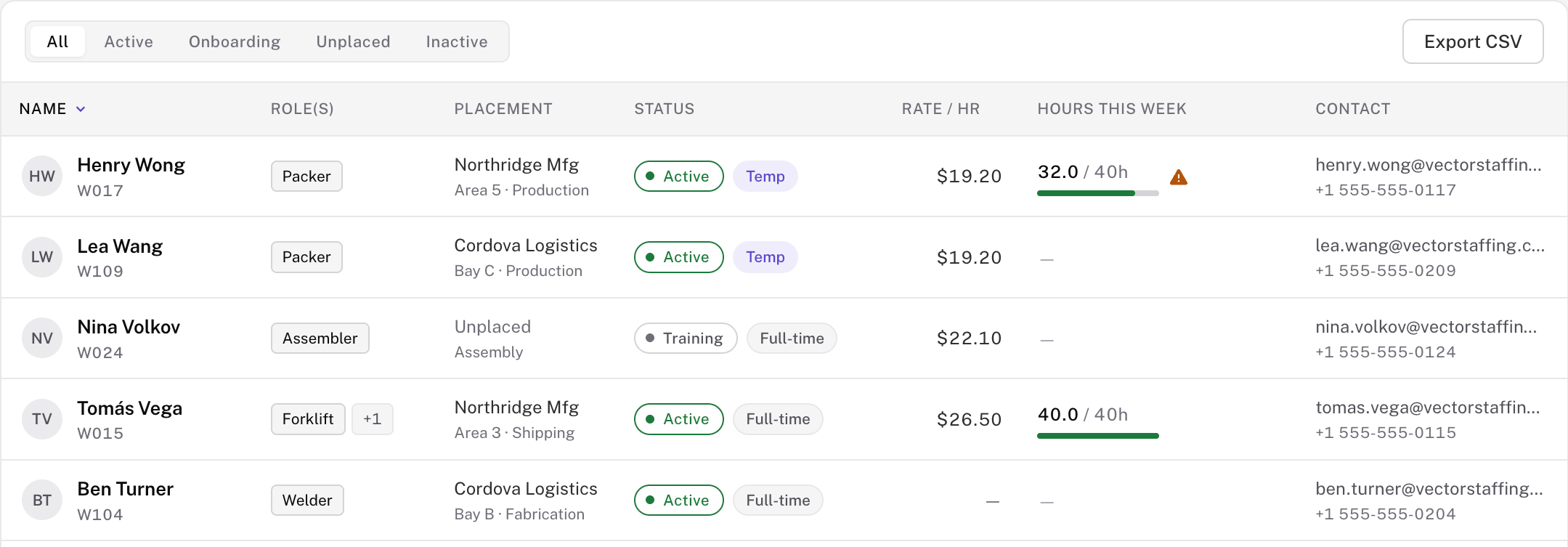
People registry shows role, placement, employment status, rate and weekly hours
Status
Rate
Committed hours
Supporting source-of-record view. The capture shows roles/status/rates/hours. Patrick’s HR training-tag rule is described; do not claim a certification detail view is shown. Prototype records use sample data.

Competitive analysis

Appendix · A2

Not one vendor fit both sides of the problem.

VendorCategoryStaffing fitMfg fitHybrid
BullhornStaffing OS5 / 51 / 52 / 5
TempWorksStaffing OS4 / 52 / 52 / 5
ShiftboardMfg WFM1 / 55 / 52 / 5
UKG WFMMfg WFM2 / 54 / 53 / 5
ShiftForgeOrchestration layer4 / 54 / 54 / 5

I compared 14 workforce products.

Gap identified: staffing tools know placements and rates; workforce tools know coverage and hours. Corrections and reconciliation sit between them. This is an internal competitive synthesis across 14 products: sourcing, scheduling, time, approvals, payroll readiness, invoicing, manufacturing fit, staffing OS fit, and agency economics. The four named vendors are representative examples; ShiftForge is the intended design target, not an incumbent measured in the same market scan. Staffing OS strengths: sourcing to invoicing, agency economics and payroll readiness; common gaps: manufacturing fit, UX and implementation. Manufacturing WFM strengths: scheduling, time compliance and labor-cost reporting; gaps: agency economics and staffing-specific invoicing. Recruiting CRM/SMB tools were also reviewed but had less scheduling or back-office depth. Scores on this slide are the presentation synthesis supplied by Patrick; the older archived CSV uses a different scoring scheme.